If you spend long hours working at a computer, maintaining good posture is one of the most important habits for protecting your long term health. Poor posture can gradually lead to neck pain, shoulder tension, lower back discomfort, headaches, and reduced productivity, often without you noticing the problem at first.
Fortunately, improving your posture does not require expensive equipment or major lifestyle changes. In many cases, a few simple adjustments to your workstation, combined with healthier daily habits, can significantly improve comfort and reduce physical strain throughout the workday.
In addition to creating a better desk setup, regular movement, stretching, and strength building all play an important role in supporting healthy posture. Together, these habits help reduce muscle fatigue and make long hours at the computer more comfortable.
For a complete workplace wellness strategy, explore our guide on **Health and Fitness for Office Workers**. You may also find our articles on **Best Stretches for Office Workers** and **Daily Mobility Routine for Desk Workers** useful for improving flexibility and reducing stiffness caused by prolonged sitting.
In this complete guide, you’ll learn how to improve posture while working at a computer, set up an ergonomic workstation, avoid common posture mistakes, and build simple daily habits that support better comfort, productivity, and long term health.
Quick Answer
The best way to improve posture while working at a computer is to sit with your back fully supported, keep your feet flat on the floor, position your monitor at eye level, relax your shoulders, and take regular movement breaks every 30 to 60 minutes. Combining proper workstation ergonomics with consistent daily movement can help reduce muscle strain and improve overall comfort.
Table of Contents
- Why Posture Matters
- Signs Your Posture Needs Improvement
- Common Causes of Poor Computer Posture
- How to Set Up an Ergonomic Workstation
- Daily Habits That Improve Posture
- Common Posture Mistakes
- FAQs
- Conclusion
Why Posture Matters
Posture affects more than appearance.
Good posture helps distribute stress evenly across muscles and joints, allowing your body to work more efficiently.
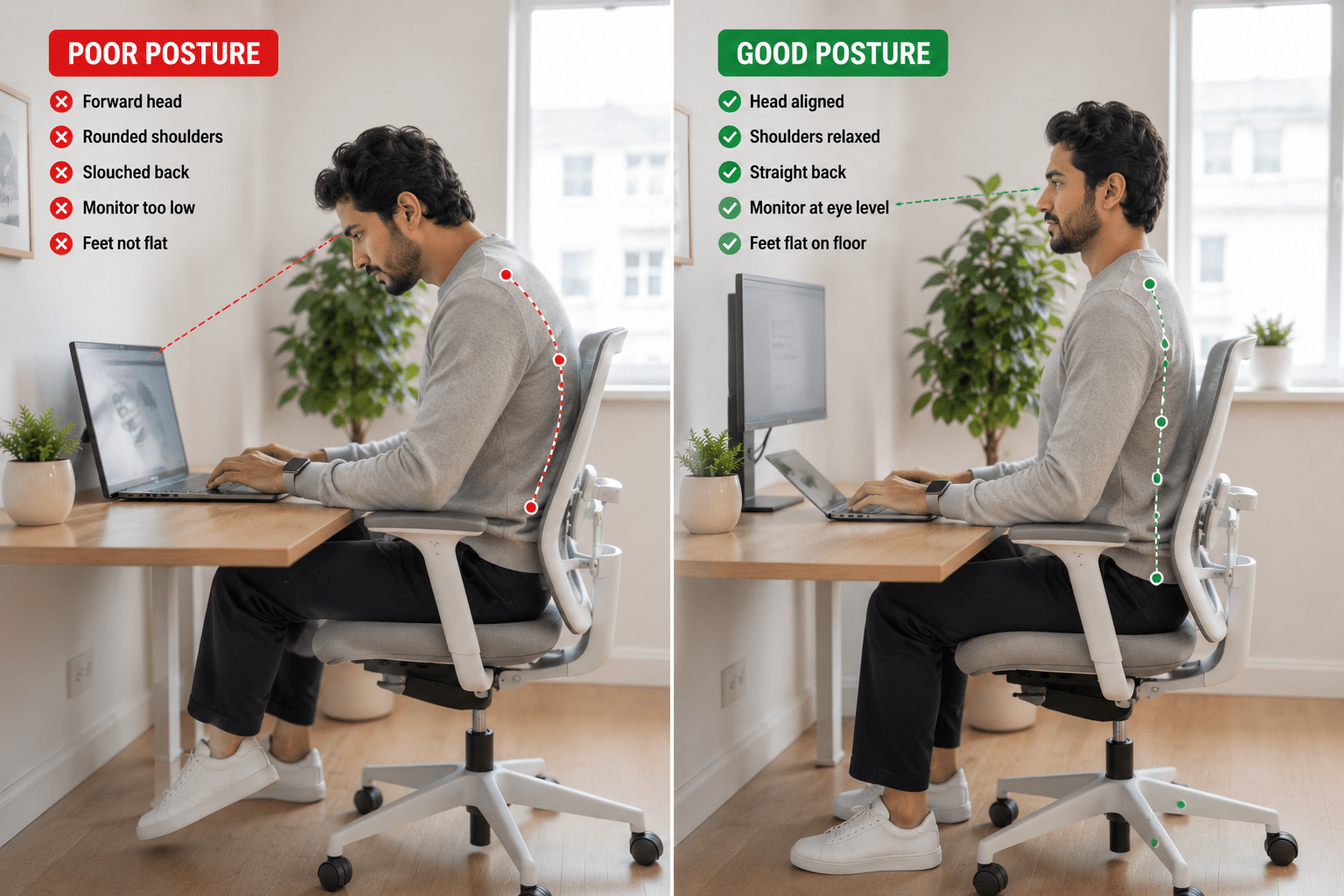
Poor posture can contribute to:
- Neck pain
- Shoulder tension
- Lower back discomfort
- Hip tightness
- Headaches
- Reduced energy levels
- Muscle fatigue
According to Cleveland Clinic, proper posture helps reduce strain on muscles, ligaments, and joints while supporting overall musculoskeletal health.
Signs Your Posture Needs Improvement
Many posture problems develop gradually.
Common warning signs include:
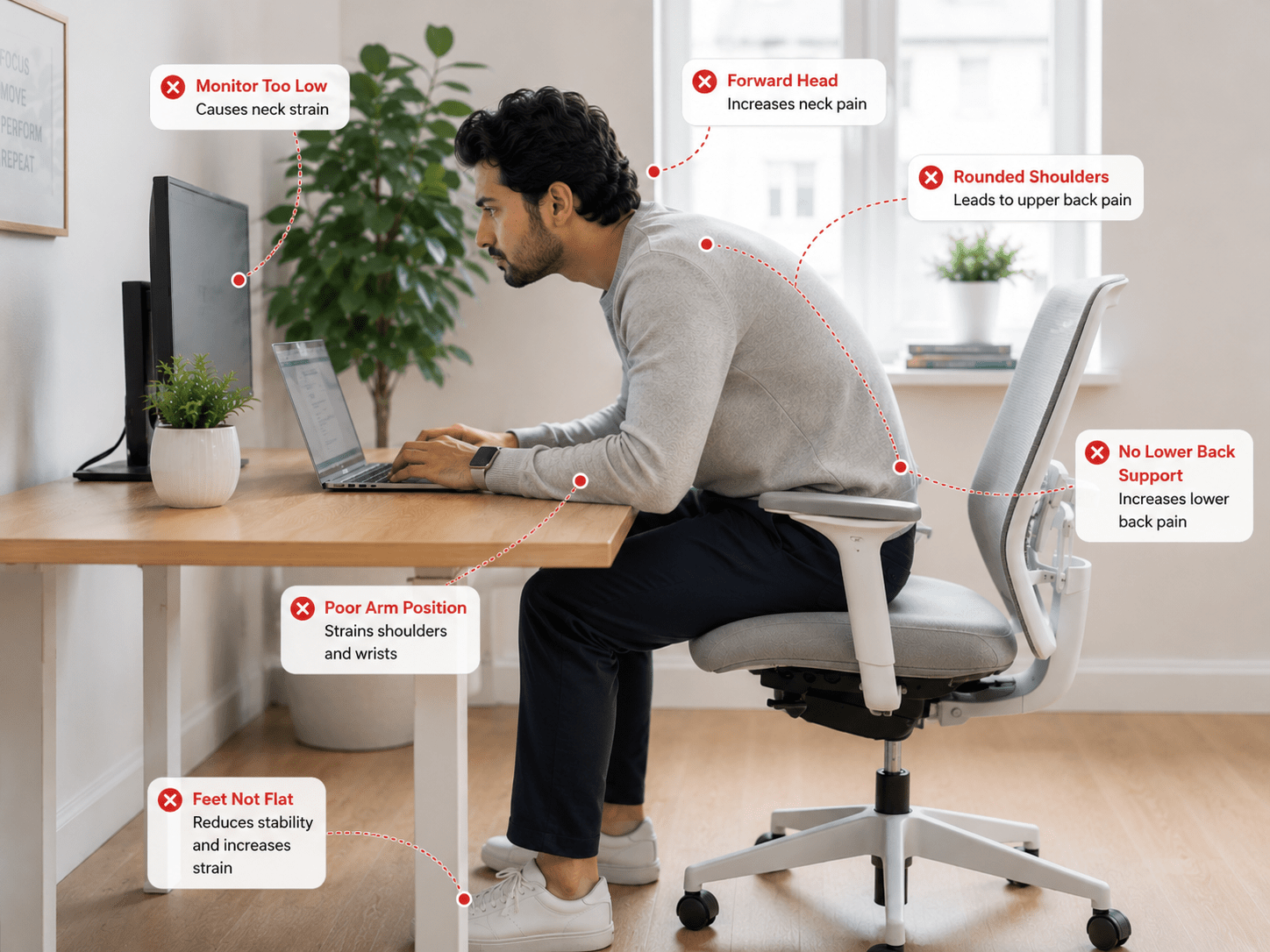
Frequent Neck Pain
Looking down at screens for long periods places stress on the neck.
Rounded Shoulders
Shoulders often roll forward when sitting incorrectly.
Lower Back Discomfort
Poor sitting position can place unnecessary stress on the lumbar spine.
Headaches
Tension in the neck and shoulders may contribute to headaches.
Feeling Stiff After Work
A lack of movement and poor posture often lead to stiffness throughout the body.
If these symptoms sound familiar, your workstation setup and daily habits may need attention.
Good posture is built through consistent daily habits rather than perfect sitting positions. Even with an ergonomic workstation, staying in the same position for hours can lead to stiffness and discomfort. Changing your posture regularly, standing up every 30 to 60 minutes, and performing simple stretches throughout the day can make a meaningful difference to your long term comfort and overall well being.
Common Causes of Poor Computer Posture
Sitting Too Long
Even perfect posture becomes problematic when maintained for several hours without movement.
If sitting all day is a challenge for you, read our guide on How to Stay Active When You Sit All Day at Work.
Incorrect Monitor Height
One of the most common posture mistakes is positioning the monitor too low.
This encourages forward head posture and neck strain.
Lack of Movement
Mobility and posture work together.
Regular movement helps maintain healthy posture throughout the day.
Weak Supporting Muscles
The core, upper back, and glutes all play an important role in posture.
Weakness in these areas can make it difficult to maintain proper alignment.
How to Set Up an Ergonomic Workstation
Creating a supportive workstation is one of the easiest ways to improve posture.
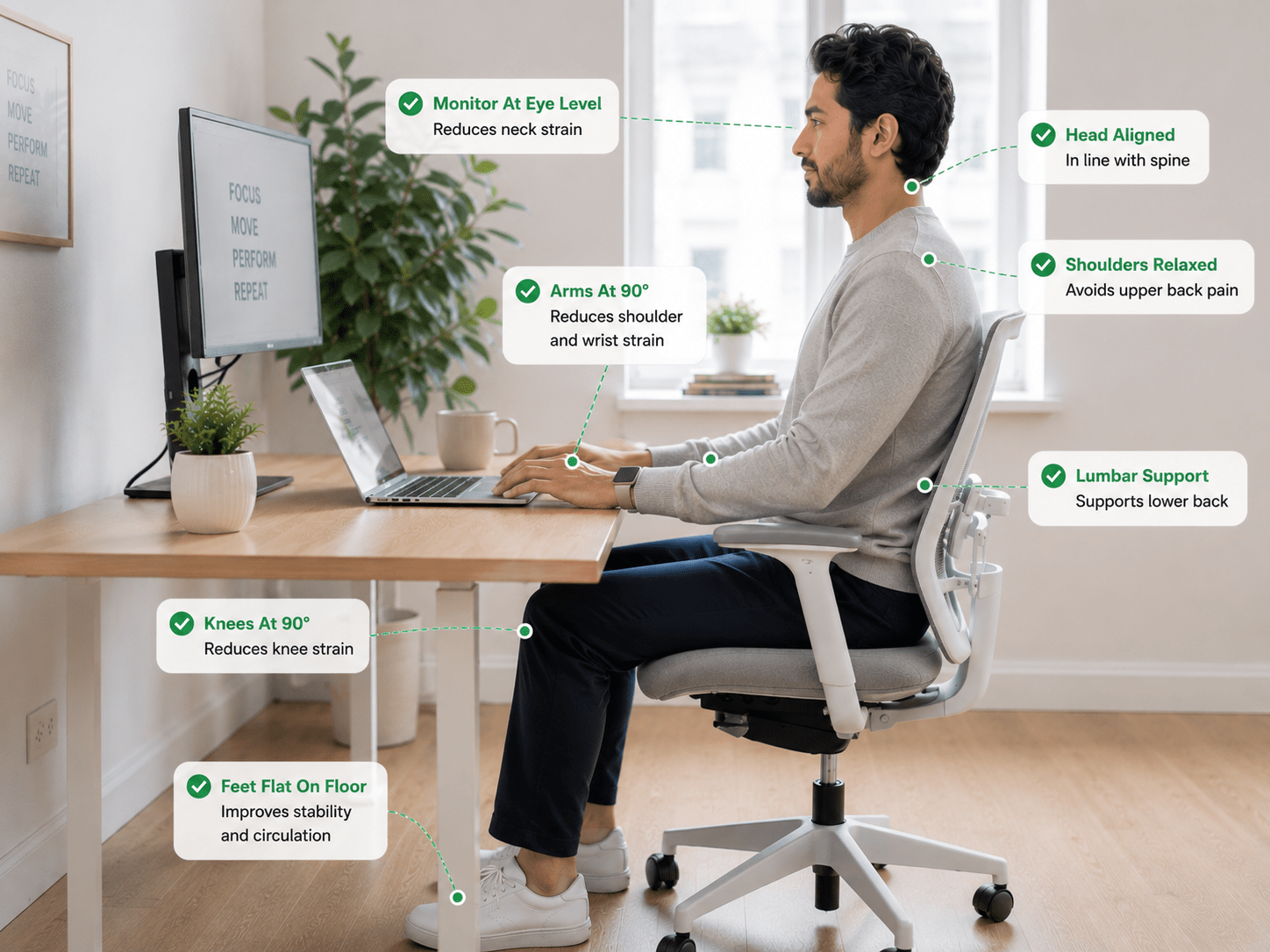
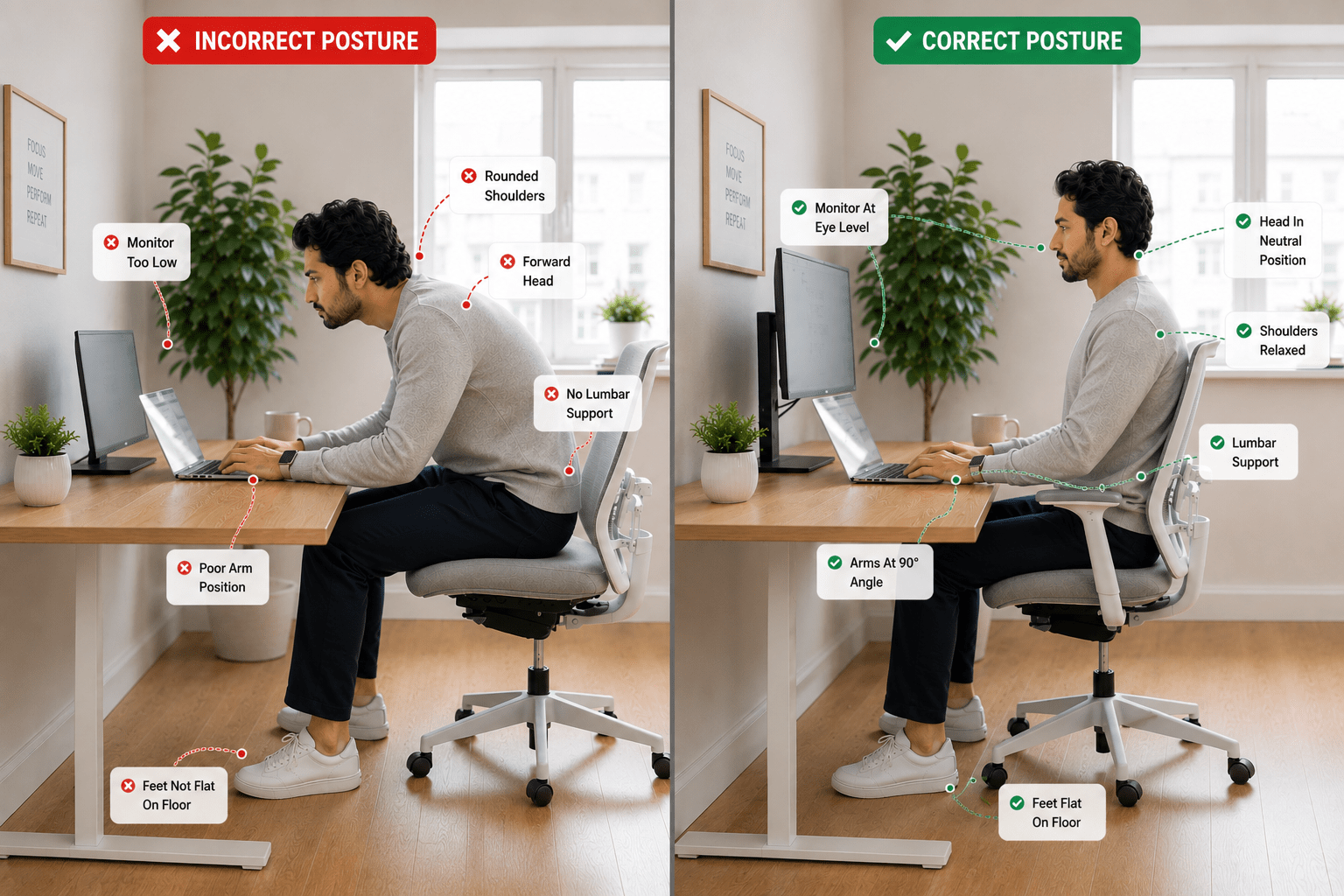
1. Position Your Monitor Correctly
The top of your monitor should be at or slightly below eye level.
This helps maintain a neutral neck position.
According to OSHA Ergonomics Guidance, monitor placement plays an important role in reducing strain associated with computer work.
2. Adjust Your Chair Height
Your feet should rest comfortably on the floor.
Your knees should be approximately level with your hips.
3. Support Your Lower Back
Choose a chair that supports the natural curve of your spine.
If necessary, use a lumbar support cushion.
4. Position Your Keyboard Properly
Your elbows should remain close to your body.
Wrists should stay neutral rather than bent upward.
5. Keep Frequently Used Items Nearby
Reducing unnecessary reaching helps maintain better posture throughout the day.
The Ideal Sitting Posture for Office Workers
When sitting at a computer:
Head
Keep your head aligned with your shoulders.
Avoid pushing your chin forward.
Shoulders
Keep shoulders relaxed and slightly back.
Back
Maintain the natural curve of your spine.
Arms
Elbows should remain close to your body.
Hips
Keep hips positioned comfortably against the back of the chair.
Feet
Place both feet flat on the floor.
Good posture should feel natural, not forced.
Daily Habits That Improve Posture
Move Every 30 to 60 Minutes
Regular movement breaks help prevent stiffness and fatigue.
Perform Mobility Exercises
Mobility work supports healthy movement patterns.
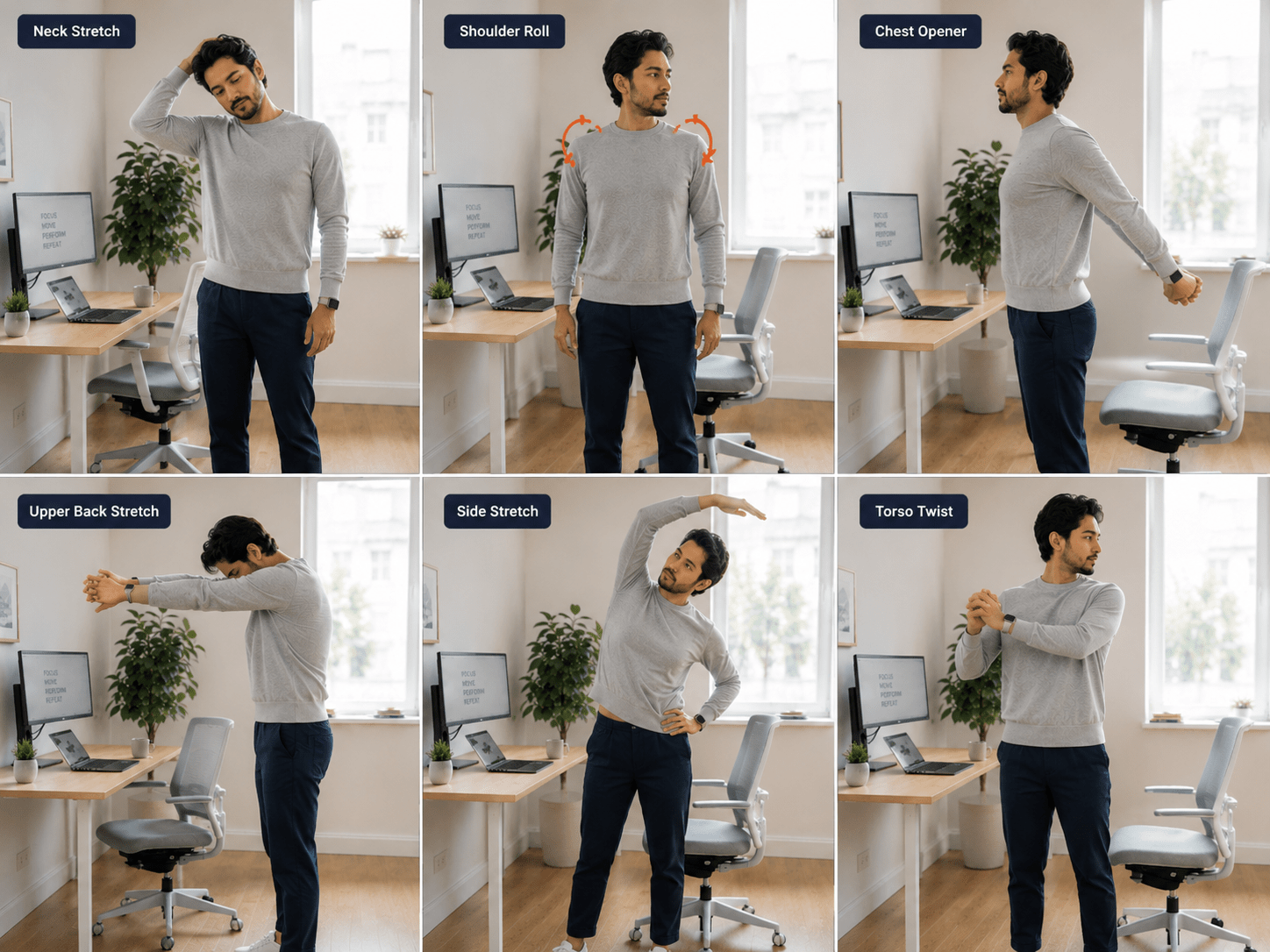
Our Daily Mobility Routine for Desk Workers provides a simple routine that fits into most work schedules.
Stretch Tight Muscles
Stretching can help relieve tension in the neck, shoulders, hips, and back.
Our guide on Best Stretches for Office Workers covers several effective options.
Strengthen Supporting Muscles
Strength training can help improve posture over time.
Focus on:
- Core muscles
- Upper back
- Glutes
- Shoulders
Use Movement Breaks Throughout the Day
Simple movement breaks can reduce the negative effects of prolonged sitting.
If back discomfort is already affecting you, try these 5 Minute Desk Workouts to Relieve Back Pain for Remote Workers.
A Simple Posture Checklist
Before starting work, check that your monitor is at eye level, your shoulders are relaxed, your back is fully supported, and your feet rest flat on the floor. Keep your elbows close to your body, maintain a neutral wrist position while typing, and remember to stand up and move every 30 to 60 minutes. These simple habits can improve posture and reduce discomfort throughout the day.
| Checkpoint | Status |
|---|---|
| Monitor at eye level | ✅ |
| Shoulders relaxed | ✅ |
| Back supported | ✅ |
| Feet flat on the floor | ✅ |
| Elbows close to your body | ✅ |
| Wrists in a neutral position | ✅ |
| Take a movement break every 30 to 60 minutes | ✅ |
Even small corrections can improve comfort over time.
Common Posture Mistakes Office Workers Make
Leaning Toward the Screen
Bring the screen closer instead of leaning forward.
Crossing Legs for Long Periods
Frequent crossing can contribute to muscle imbalances.
Ignoring Discomfort
Pain and stiffness are often signals that changes are needed.
Sitting Without Breaks
No posture is ideal for eight continuous hours.
Movement remains essential.
Overcorrecting
Good posture should feel relaxed and sustainable.
Avoid forcing unnatural positions.
Important Points to Remember
- Posture affects comfort, productivity, and long-term health.
- Small adjustments often produce significant improvements.
- Movement remains essential even with excellent posture.
- Ergonomic workstations support healthy alignment.
- Consistency matters more than perfection.
Key Takeaways
- A fully supported back helps maintain healthy posture.
- Your monitor should remain at eye level to reduce neck strain.
- Relaxed shoulders and neutral wrists improve comfort while working.
- Regular movement breaks every 30 to 60 minutes help prevent stiffness.
- Consistent posture habits provide better long term results than occasional adjustments.
Frequently Asked Questions
How long does it take to improve posture?
Many people notice improvements within a few weeks of consistently practicing better posture habits.
Can improving posture reduce back and neck pain?
Yes. Improving posture can help reduce unnecessary strain on the muscles, joints, and spine, which may decrease back and neck discomfort over time. Combining proper posture with regular movement breaks, stretching, and an ergonomic workstation provides the greatest long term benefits.
Can posture cause neck and shoulder pain?
Yes. Poor posture often contributes to muscle tension and discomfort.
Is an expensive ergonomic chair necessary?
Not always. Proper setup and movement habits are often more important.
Should I use a standing desk?
Standing desks can be helpful, but regular movement remains the priority.
What is the biggest posture mistake office workers make?
Forward head posture caused by low monitor placement is one of the most common issues.
Disclaimer
This article is for educational purposes only and should not be considered medical advice. Consult a qualified healthcare professional if you have persistent pain, injuries, or health concerns.
Conclusion
Improving posture while working at a computer doesn’t require drastic changes.
Simple adjustments to your workstation, combined with regular movement, stretching, and mobility work, can help reduce discomfort and support better long-term health.
Start with one or two improvements today and build from there. Consistent small changes often produce the biggest results over time.
For a complete workplace wellness strategy, explore our guide on Health and Fitness for Office Workers.